What Problems Does This Article Help You Solve?
You may have encountered one of these situations:
- Want to try UWB positioning but don't want to start from chip-level development — Plug the UWB653Pro into your computer's USB port, configure it with AT commands, and get ranging working in minutes.
- Need to do personnel tracking in a factory, mine, or warehouse but don't know where to start — This article explains the complete architecture of anchors + tags + Mesh relays, along with deployment notes.
- Need to demo a UWB solution for a client but don't have hardware ready — The UWB653Pro is the size of a USB drive; carry it with you and demonstrate on-site.
- Bought a UWB module but ranging keeps being inaccurate — This article covers two calibration mechanisms — antenna delay calibration and ranging offset calibration — to help you dial in accuracy.
Table of Contents
- What is the UWB653Pro?
- How Is It Different from Traditional UWB Development?
- One Hardware, Seven Roles
- Out of the Box: Ready to Use via USB
- High-Precision Ranging and Calibration
- Positioning Features
- High-Speed Data Transfer
- RF Performance: Communication Range 1 km+
- Communication Mechanisms: Features to Improve Transmission Reliability
- Mesh Self-Organizing Network: Solving the "Obstacle in the Way" Problem
- Data Security: AES-128 Encryption
- Power Management
- Engineering Deployment Tips
- Effect of Obstructions on Ranging
- Technical Specifications Quick Reference
- Frequently Asked Questions (FAQ)
- Application Scenarios Quick Reference
1. What is the UWB653Pro?
UWB653Pro is a UWB module launched by G-NiceRF, based on the Qorvo DW3000 chip, compliant with the IEEE 802.15.4-2020 standard, operating on the CH5 (6489.6 MHz) frequency band.
It integrates data communication, ranging, and positioning into a single USB-drive-sized device. It connects directly to a computer via USB and is configured with AT commands — no firmware development required to get started.
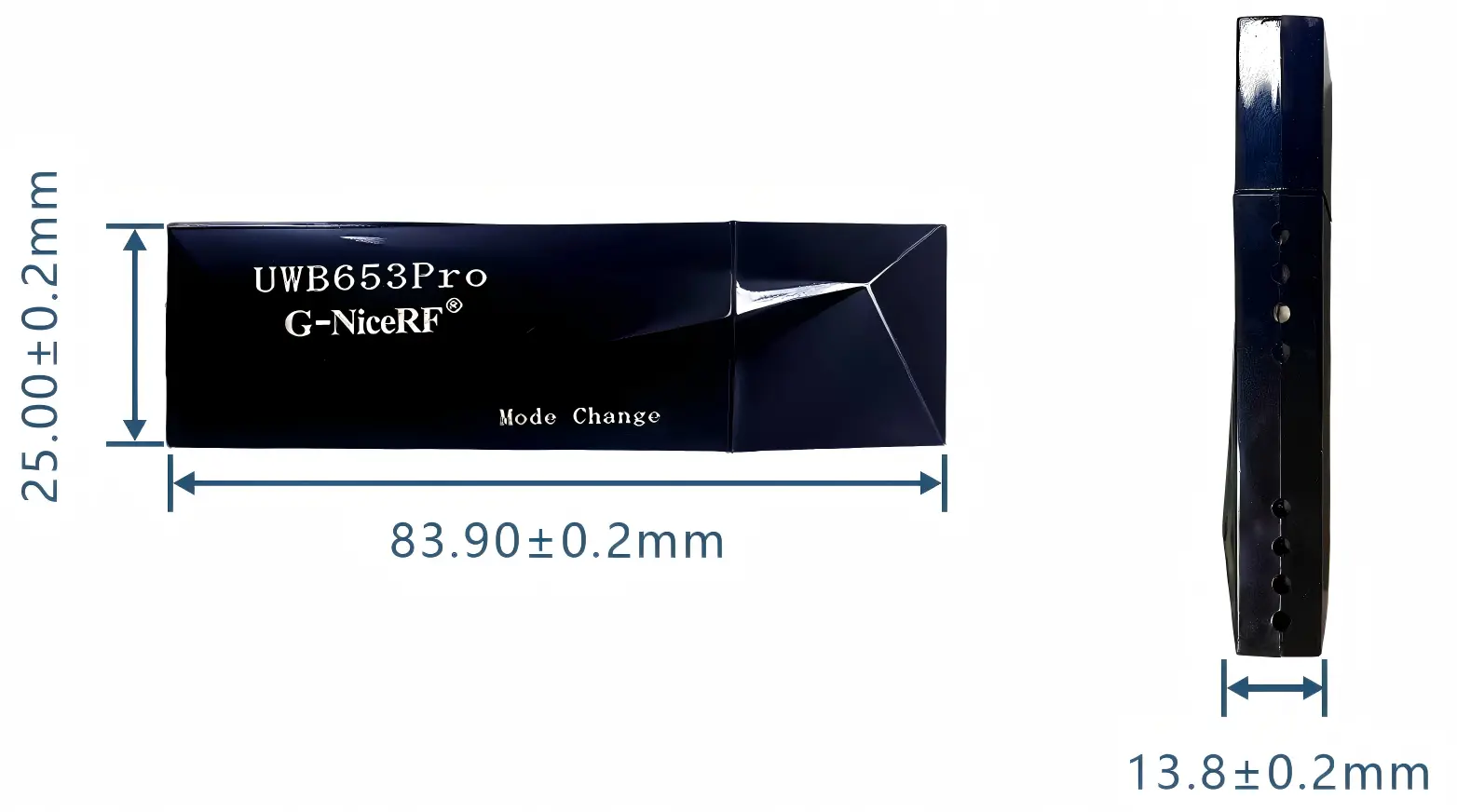
Key Specifications:
| Specification | Value |
|---|
| Ranging Accuracy | ~±10 cm |
| Data Communication Range | > 1 km |
| Air Data Rate | 6.8 Mbps / 850 Kbps |
| Max Transmit Power | 27.7 dBm (Level 10) |
| Dimensions | 83.90 × 25.00 × 13.8 mm |
2. How Is It Different from Traditional UWB Development?
Traditional UWB development, whether starting from a chip or a module, typically requires some degree of secondary development:
- Starting from a UWB chip: Requires designing RF circuitry, writing low-level drivers, and debugging communication protocols.
- Starting from a UWB module: RF circuitry is already integrated, but you still need to connect the module to your own MCU or controller board and write firmware to control it.
The UWB653Pro eliminates all of these steps. It integrates a DW3000 UWB chip, a CH340 USB-to-serial chip, LDO power regulation, and ESD protection into a single plug-and-play USB device:
| What You Need to Do | Traditional Development | UWB653Pro |
|---|
| Hardware Integration | Design a carrier board or baseboard and connect the module | Plug directly into computer USB port, no extra hardware needed |
| Software Development | Write firmware to control module | Send AT commands via serial tool; parameters saved to Flash |
| Function Switching | Different functions may require firmware changes | Same hardware; switch roles via AT commands |
The UWB653Pro lowers the barrier from "requires secondary development" to "configurable via serial port."
3. One Hardware, Seven Roles
The UWB653Pro can be configured into different roles via AT commands. Just send the corresponding command to build a complete ranging, positioning, and networking system.
| Role | Function | When to Use |
|---|
| Anchor | Positioning reference point, fixed deployment | When setting up a positioning system |
| Tag | Mobile unit that outputs its own coordinates | When worn by personnel or attached to assets |
| Initiator (Ranging Master) | Actively initiates ranging | When you need to know "how far am I from the other device" |
| Responder (Ranging Slave) | Responds to ranging requests | As the target being measured |
| Node | Data send/receive terminal | For point-to-point or networked communication |
| Router | Forwards data in a Mesh network | When extending communication range |
| Node+Router | Both sends/receives and forwards | When a device needs to communicate and relay for others |
4. Out of the Box: Ready to Use via USB
Three Steps to Get Started
- Plug the UWB653Pro into your computer's USB port (power and communication are both via USB; operating voltage 5.0~5.5 V)
- Install the CH340 driver, then open any serial terminal tool (e.g., SSCOM, PuTTY)
- Send AT commands to configure parameters, start ranging, or transfer data
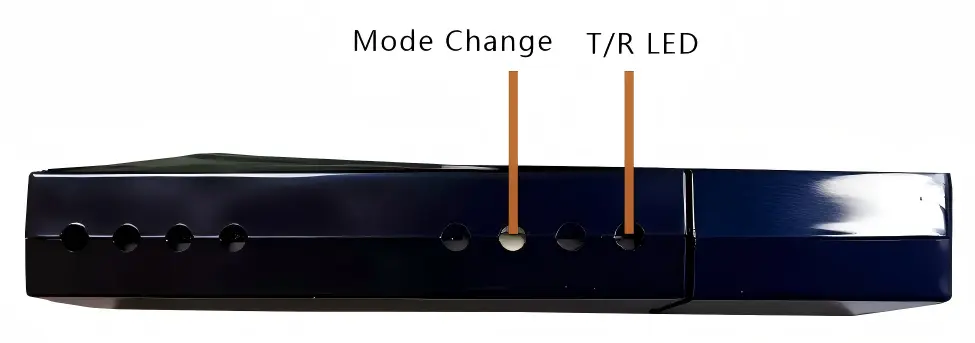
When powered on, the red/blue indicator LEDs at the T/R LED position will briefly light up for about 0.5 seconds to indicate startup completion. After startup, the serial port will output Finished Startup.
Common Configuration Commands
All commands begin with UWBRFAT and end with a carriage return + line feed (\r\n). Here are the most commonly used:
| What You Want to Do | Command Example |
|---|
| Check if module is functioning | UWBRFAT → replies OK |
| View/set serial baud rate | UWBRFAT+BAUDRATE? / UWBRFAT+BAUDRATE=1 (115200) |
| View/set air data rate | UWBRFAT+DATARATE? / UWBRFAT+DATARATE=1 (6.8 Mbps) |
| Set PAN ID and address | UWBRFAT+DEVICEID=0000,0001 |
| Set TX destination address | UWBRFAT+TXTARGET=0002 |
| Adjust TX power (levels 0~10) | UWBRFAT+POWER=10 (max power) |
| Set preamble code | UWBRFAT+PREAMBLECODE=9 (range 9~24) |
| Enable AES-128 encryption | UWBRFAT+SECURITY=1,000102030405060708090A0B0C0D0E0F |
| Enable/disable RX | UWBRFAT+RXENABLE=1 / UWBRFAT+RXENABLE=0 |
| Save parameters to Flash | UWBRFAT+FLASH |
| Restore default parameters | UWBRFAT+DEFAULT (will restart module) |
Tip: Commands marked with * in Chapter 9 of the datasheet can be saved to Flash via UWBRFAT+FLASH and will persist through power cycles. For the full command list, refer to Chapter 9 of the UWB653Pro datasheet.
Serial Receive Mechanism
The module uses timeout detection to determine the amount of data received on the USB port: after receiving the first byte, a ~5 ms timer starts; the timer resets with each new byte received, until the receive buffer is full or the timer times out, at which point data processing begins.
If you do not need to configure parameters, avoid sending data packets that begin with UWBRFAT and end with \r\n, as these may be interpreted as commands by the module.
Two Operating Modes
- Normal Mode (default): Simultaneously supports AT command responses, ranging/positioning, and data transfer.
- Pure Data Transfer Mode: Does not respond to any commands or perform ranging/positioning — all resources are dedicated to data transfer. Hold the Mode Change button for ~100 ms to switch (indicator light flashes 3 times continuously = enter pure data mode; 3 double-flashes = exit).
5. High-Precision Ranging and Calibration
Ranging Method
The UWB653Pro does not rely on a single ranging method. It combines DS-TWR (Double-Sided Two-Way Ranging) with SS-TWR (Single-Sided Two-Way Ranging), plus peer-side clock offset correction, to minimize the impact of crystal oscillator errors.
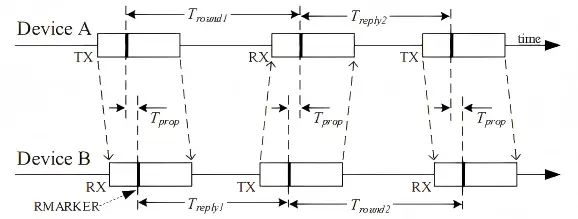

Note: Due to the nature of this combined algorithm, the distance values obtained on each side of the ranging pair will differ slightly, but they are generally within the error margin — this is normal behavior.
| Specification | Value |
|---|
| Ranging Accuracy | ~±10 cm |
| Fastest Ranging Time | ~3.6 ms (6.8 Mbps, Responder side) |
Ranging time reference for different air data rates:
| Air Data Rate | Initiator Time | Responder Time |
|---|
| 6.8 Mbps | 4.106 ms | 3.635 ms |
| 850 Kbps | 4.853 ms | 4.145 ms |
Two-Layer Calibration
The UWB653Pro provides two calibration entry points to help achieve better ranging accuracy in real deployments:
① Antenna Delay Calibration (ANTDELAY)
There is a fixed delay from the chip to the antenna emission. If this delay value is inaccurate, ranging and positioning results will be off. Different antenna models have different delays and must be configured individually.
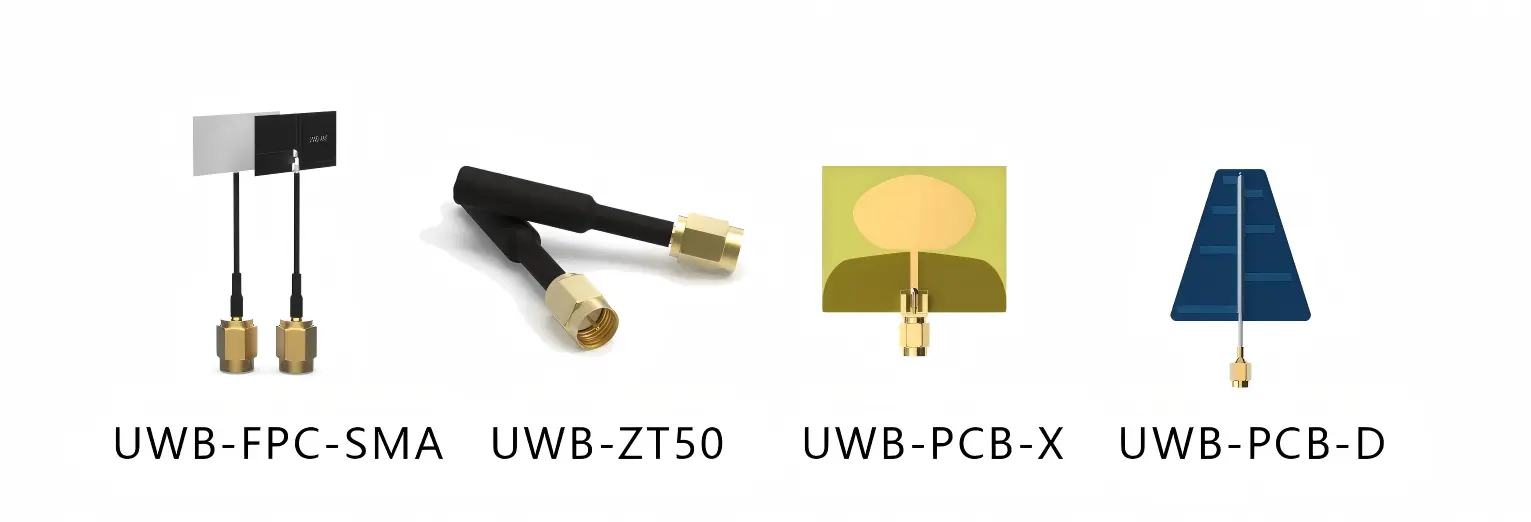
If you use one of the four officially recommended antennas from G-NiceRF, you can use the following suggested values directly:
| Antenna Model | Type | Suggested Delay | Recommendation Level |
|---|
| UWB-PCB-X | PCB Antenna | 16433 | Performance Priority |
| UWB-ZT50 | Rod Antenna | 16408 | Performance Priority |
| UWB-PCB-D | PCB Antenna | 16476 | Standard |
| UWB-FPC | FPC Flexible + SMA | 16452 | Standard |
If using a third-party antenna, manual calibration is required. Refer to the guide "How to Calibrate Antenna Delay for the UWB653Pro Module."
Set command: UWBRFAT+ANTDELAY=16433 (range: 0~65535, default: 16400)
② Ranging Offset Calibration (DISTOFFSET)
Used to compensate for systematic bias. If a fixed offset remains after antenna delay calibration, this parameter can fine-tune the result.
- A positive offset value adds that amount to the ranging result
- A negative offset value subtracts from the ranging result
Set command: UWBRFAT+DISTOFFSET=5 (range: -500~500 cm, default: 0)
How to Choose an Antenna?
- Compact spaces (e.g., embedded in device housing) → PCB antenna (UWB-PCB-X or UWB-PCB-D)
- Open environments or long range needed → Rod antenna (UWB-ZT50)
- Flexible installation needed → FPC flexible antenna (UWB-FPC)
For best performance, prefer UWB-ZT50 and UWB-PCB-X.
6. Positioning Features
Basic Rules
| Positioning Mode | Min. Anchors | Max. Anchors |
|---|
| 2D Plane Positioning | 3 | 8 |
| 3D Space Positioning | 4 | 8 |
The positioning function uses a DS-TWR-based scheme. Workflow: the Tag sequentially ranges with each Anchor, then calculates its own x/y/z coordinates, and outputs distance values to each anchor along with RSSI signal strength.
Anchor coordinates are set via UWBRFAT+COORDINATE=x,y,z (unit: cm, range 0–100000, i.e., 0–1 km).
Multi-Tag Support
Thanks to millisecond-level ranging speed, the system can quickly poll multiple tags. At 6.8 Mbps, a single ranging takes ~4 ms. The actual number of tags that can be served simultaneously depends on the number of anchors, positioning refresh rate, and other deployment requirements.
Poor Positioning Accuracy? Check These First
If positioning is not ideal, check the following in order:
- Have anchor coordinates been accurately measured and set?
- Are anchors mounted at least 2 m above the ground?
- Are there obstructions between the tag and some anchors? Try relocating poorly-performing anchors and re-surveying.
- Are anchors on the same horizontal plane (if required for your scenario)?
- Is the tag far outside the area enclosed by the anchors?
- Check the distances to anchors in the tag's output — if they are outside the ranging error range, adjust the antenna delay or ranging offset parameters.
7. High-Speed Data Transfer
Maximum Packet Size
The UWB653Pro is based on the DW3000's 1023-byte transceiver buffer. Subtracting 11 bytes of fixed frame header (Frame Control 2B + Sequence Number 1B + PAN ID 2B + Destination Address 2B + Source Address 2B + FCS 2B), the maximum user payload per packet is 1012 bytes. Maximum packet size under different modes:
| Mode | Max User Payload per Packet |
|---|
| Normal Mode | 1012 bytes |
| AES-128 Encryption | 996 bytes (16-byte encryption overhead) |
| Mesh Network | 1004 bytes |
| Mesh + AES-128 | 988 bytes |
Transmission Latency Reference

The time from transmission to output at the receiver depends on the serial port rate, air data rate, and packet size. The following are measured data from G-NiceRF:
At 6.8 Mbps:
| Data Length | Transmission Latency |
|---|
| 1 byte | 4.782 ms |
| 500 bytes | 8.078 ms |
| 1011 bytes | 11.393 ms |
| 1012 bytes | 7.168 ms |
At 850 Kbps:
| Data Length | Transmission Latency |
|---|
| 1 byte | 5.019 ms |
| 500 bytes | 12.363 ms |
| 1011 bytes | 19.85 ms |
| 1012 bytes | 15.715 ms |
Why is 1012 bytes faster than 1011 bytes? After receiving the first byte, the module starts a ~5 ms timeout timer. 1012 bytes exactly fills the transceiver buffer (1012 + 11 = 1023), so the module sends immediately without waiting for timeout. 1011 bytes does not fill the buffer, so the module must wait for the timer to expire before sending. If latency is critical for your application, send full 1012-byte packets whenever possible.
Pure Data Transfer Mode
If you only need data transfer (e.g., as a wireless serial bridge) and don't need ranging or positioning, switch to Pure Data Transfer Mode. In this mode:
- Does not respond to any AT commands
- Does not execute ranging/positioning routines
- All resources are dedicated to data transfer
- Switch using the Mode Change button
Note: Data sent in Pure Data Transfer Mode will not include ACK requests.
8. RF Performance: Communication Range Up to 1 km+
The UWB653Pro integrates a high-performance RF power amplifier (PA), with a maximum transmit power of 27.7 dBm (Level 10). Combined with receive sensitivity of -100 dBm (850 Kbps) / -94 dBm (6.8 Mbps), data communication range can exceed 1 km.
Note: 1 km+ primarily refers to data communication range. Ranging and positioning accuracy are affected by distance, obstructions, multipath, and other environmental factors — accuracy may decrease at long distances.
11-Level Adjustable TX Power
From -5 dBm to 27.7 dBm, 11 levels (0~10), set via UWBRFAT+POWER=. Default is Level 10 (max power).
| Level | Output Power | Typical Use Case |
|---|
| 0~2 | -5 ~ 2.14 dBm | Short range (<10 m), reduce multipath effects |
| 3~6 | 7.5 ~ 14 dBm | Medium range (10~100 m) |
| 7~10 | 17 ~ 27.7 dBm | Long range (100 m+), through-wall scenarios |
When to adjust power:
- Long-range/through-wall scenarios: Increase power to ensure reliable link
- Short-range scenarios: Reduce power to mitigate multipath effects and improve ranging accuracy
- Battery-powered scenarios: Reduce power to extend battery life
- Dense deployment scenarios: Reduce power to minimize mutual interference
Note on close-range use: Due to the high transmit power of the UWB653Pro, multipath effects are significant when used within a small area (approximately 100 cm × 100 cm), which may cause ranging data to drift. It is recommended to operate in larger spaces, or reduce transmit power at close range.
9. Communication Mechanisms: Features to Improve Transmission Reliability
Three Transmission Modes
| Mode | How to Use |
|---|
| Point-to-Point | Set the target address to the specific device's Address |
| Broadcast | Set target address to 0xFFFF; all devices on the same PAN ID will receive the packet |
| PAN ID Grouping | Devices with different PAN IDs do not interfere; each group can hold up to 65535 addresses |
Both PAN ID and Address range from 0x0000~0xFFFE.
Three-Layer Reliability Mechanism
① CCA (Clear Channel Assessment)
Before transmitting, the module checks whether another UWB signal is currently in the air. If a signal is detected, transmission is halted and CCA FAILURE is returned. This feature is only applicable during data transmission (not during ranging/positioning).
Command: UWBRFAT+CCAENABLE=1
② ACK (Automatic Acknowledgment)
When enabled, the transmitter appends an ACK request. The receiver automatically replies with ACK upon successful reception. The transmitter determines success based on whether ACK is received:
- ACK received → replies ACK DETECTED
- Timeout without ACK → replies ACK WAIT TIMEOUT
Upper-layer applications can decide whether to retransmit based on the ACK result.
Command: UWBRFAT+ACKENABLE=1
Note: ACK requests are not sent in broadcast mode (target address 0xFFFF), nor in Pure Data Transfer Mode.
③ Hardware-Level Frame Filtering
The UWB chip automatically rejects the following invalid data:
- Destination PAN ID does not match the device's own
- Destination Address is neither 0xFFFF nor the device's own address
- FCS (Frame Check Sequence) error
- Frame type is not "Data"
- Other content non-compliant with IEEE 802.15.4-2020
No additional MCU processing needed, reducing system overhead.
Preamble Code Isolation: Deploying Multiple Systems in the Same Space
The preamble code can be set to any value from 9 to 24. UWB modules with different preamble codes cannot communicate with each other at all, effectively dividing the shared space into multiple independent, non-interfering "channels."
If multiple UWB systems are running simultaneously in the same facility, assign each system a different preamble code to prevent mutual interference.
10. Mesh Self-Organizing Network: Solving the "Obstacle in the Way" Problem
When Do You Need Mesh?
When two nodes are too far apart, or obstacles block direct communication, relay nodes can be placed in between to "relay" data to its destination.
Three Mesh Roles
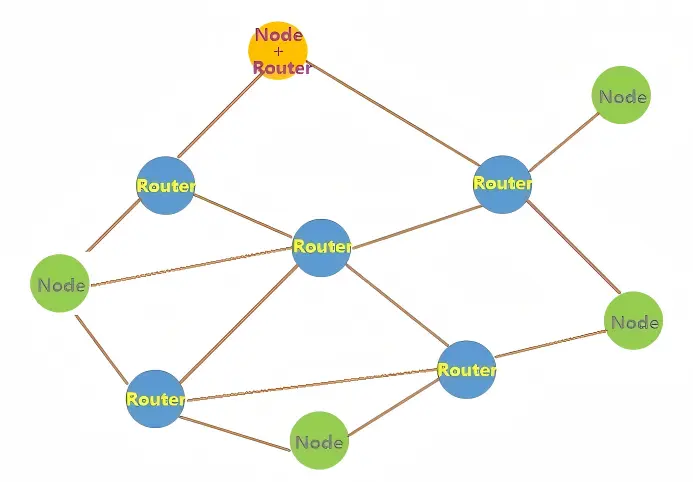
| Role | Behavior | Command Parameter |
|---|
| Router (Relay) | Receives and forwards data within the same network | UWBRFAT+MESHENABLE=1 |
| Node | Sends/receives its own data; does not forward others' | UWBRFAT+MESHENABLE=2 |
| Node+Router | Handles its own traffic and also relays for others | UWBRFAT+MESHENABLE=3 |
Disable Mesh: UWBRFAT+MESHENABLE=0 (default)
Key Limitations

- Maximum hop count: 10 — when the number of relay forwards exceeds 10, further forwarding is stopped to prevent infinite data loops in the network.
- Maximum packet size in Mesh mode is 1004 bytes; if AES-128 encryption is also enabled, the maximum is 988 bytes.
- Modules with Mesh enabled cannot communicate with modules that do not have Mesh enabled for regular data transfer (ranging/positioning features are unaffected).
Typical Applications
Mine tunnels, multi-workshop factories, multi-floor buildings — in these environments, line-of-sight communication is often impossible, but with strategically placed relay nodes, communication dead zones can be covered.
11. Data Security: AES-128 Encryption
| Encryption Scheme | Support Status |
|---|
| AES-128 | Supported in standard firmware |
| AES-256 | Contact G-NiceRF for customization |
When encryption is enabled, data is encrypted at the air link layer — encrypted at the sender, decrypted at the receiver. Data in transit cannot be eavesdropped or tampered with.
The key is 16 bytes, entered as 32 hexadecimal characters. Set via command:
UWBRFAT+SECURITY=1,000102030405060708090A0B0C0D0E0F
The default key is 000102030405060708090A0B0C0D0E0F. Encryption can be enabled in both data transfer and Mesh mode.
When encryption is active, each packet's effective payload is reduced by 16 bytes (encryption overhead). See the packet size table in the data transfer section.
12. Power Management
Power parameters:
| Operating State | Current | Description |
|---|
| Sleep | < 100 µA | Lowest power state |
| Standby (TX/RX off) | 32 mA | MCU running, RF off |
| SNIFF Listen | 72 mA | Intermittent reception; ~33% less than always-on RX |
| Normal RX | 107 mA | Continuously monitoring |
| TX (Continuous Frame Mode) | < 350 mA | See note below |
Note on TX current: The < 350 mA value in the spec table is the peak value in Continuous Frame Mode (non-stop transmission). In practice, since UWB data transmission is extremely fast, there is no noticeable variation in operating current. Additionally, the per-level currents in the power table (e.g., 870 mA for Level 10) are single-carrier test values; the actual maximum-power TX current in operation will not exceed 400 mA. When using ranging or positioning with small intervals, the operating current may be noticeably lower than reference values — this is normal.
SNIFF Listen Mode
When enabled, the module alternates between RX and IDLE approximately every 16 µs, with ~50% receive duty cycle, reducing listen current from 107 mA to 72 mA.
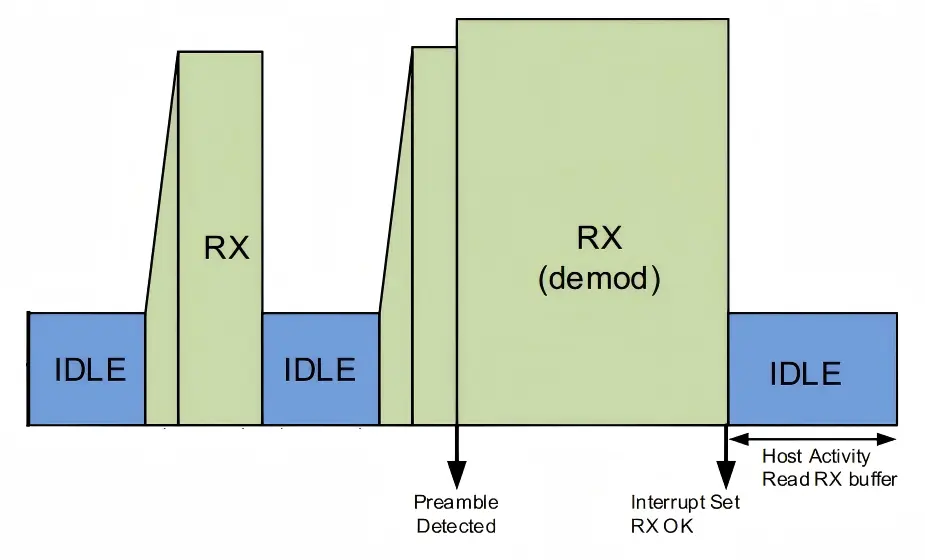
When the module enters a ranging or positioning routine, it automatically switches to always-on receive to ensure ranging accuracy is not affected. It returns to SNIFF mode after the routine completes.
Command: UWBRFAT+SNIFFEN=1
Battery-Powered Power Saving Strategies
- Enable SNIFF to reduce receive power
- Reduce TX power level
- Disable RX when not needed (UWBRFAT+RXENABLE=0; standby current 32 mA)
- Put the module to sleep when idle (< 100 µA)
13. Engineering Deployment Tips
Product Compatibility
The UWB653Pro is functionally compatible with G-NiceRF's UWB650Pro and UWB650, and can be mixed and matched. Existing projects can be gradually migrated without replacing all devices at once.
How Many Modules Do You Need?
| Use Case | Minimum Quantity |
|---|
| 1-to-1 ranging or data transfer | 2 |
| 2D plane positioning evaluation | 4 (3 anchors + 1 tag) |
| 3D space positioning | 5 (4 anchors + 1 tag) |
If Mesh networking is required, prepare additional relay nodes.
Outdoor Testing Recommendations
- Bring a 5V USB power bank
- Recommended: purchase tripods for mounting anchors at a height greater than 2 m
Industrial-Grade Protection
Both the USB interface and RF ports include ESD electrostatic protection components, improving reliability in industrial environments with frequent insertion/removal and human contact.
14. Effect of Obstructions on Ranging
This information is highly valuable for real-world deployments:
| Obstruction Type | Impact Level | Description |
|---|
| Solid wall | Severe | UWB signal cannot penetrate. If ranging is still possible around a corner, the data will definitely be inaccurate (the signal has traveled via reflection). |
| Glass wall | Significant | Noticeably affects accuracy |
| Power poles, trees | Depends on distance | If modules are 100 m apart, an obstruction in the middle has little effect. If the obstruction is within 1 m of the antenna, drift is significant. |
| Cardboard, wood (≤5 cm) | Minor | Little impact on accuracy, but signal strength will attenuate |
| Metal plate | Severe | Strong electromagnetic absorption; may completely block communication when near the module |
15. Technical Specifications Quick Reference
| Parameter | Specification |
|---|
| Core Chip | Qorvo DW3000 |
| Compliance Standard | IEEE 802.15.4-2020 |
| Operating Frequency | CH5 (6489.6 MHz) |
| Air Data Rate | 6.8 Mbps / 850 Kbps |
| Max TX Power | 27.7 dBm (Level 10) |
| Power Adjustment | 11 levels (-5 ~ 27.7 dBm) |
| Receive Sensitivity | -100 dBm (850K) / -94 dBm (6.8M) |
| Data Communication Range | 1 km+ |
| Ranging Accuracy | ~±10 cm |
| Ranging Method | DS-TWR + SS-TWR + Peer-Side Clock Offset Correction |
| Fastest Ranging Time | ~3.6 ms (6.8 Mbps, Responder) |
| Positioning Modes | 2D (≥3 anchors) / 3D (≥4 anchors), up to 8 anchors |
| Positioning Ranging Method | DS-TWR |
| Max Packet Payload | 1012 bytes (normal) / 996 (AES) / 1004 (Mesh) / 988 (Mesh+AES) |
| Encryption | AES-128 (standard) / AES-256 (custom) |
| Mesh Networking | Supported, max 10 hops |
| Preamble Code | 9~24 (selectable) |
| Interface | USB (built-in CH340) |
| Power Supply | 5V USB |
| Operating Voltage | 5.0 ~ 5.5 V |
| Operating Temperature | -20 ~ 60 °C |
| Sleep Current | < 100 µA |
| Standby Current | 32 mA |
| SNIFF Current | 72 mA |
| Normal RX Current | 107 mA |
| TX Current (Continuous Frame Mode) | < 350 mA |
| Dimensions | 83.90 × 25.00 × 13.8 mm |
| Antenna Options | 4 options (PCB×2 / Rod / FPC+SMA) |
| ESD Protection | USB + RF ports |
| Compatible Models | UWB650Pro / UWB650 |
16. Frequently Asked Questions (FAQ)
No response when sending commands via USB?
Three possible causes:
- Command format error or incorrect baud rate — if the red LED flashes when sending a command, the module received the data but cannot parse it. Default baud rate is 115200; serial port configuration is fixed at 8 data bits, 1 stop bit, no parity, no flow control.
- The module's internal CS pin is held low — when low, the module is in sleep mode and does not process serial data.
- Device is in Pure Data Transfer Mode — in this mode, no commands are recognized; the command data is treated as regular payload and transmitted. Hold the Mode Change button to exit.
Is the ±10 cm accuracy always guaranteed?
No. ±10 cm is the typical accuracy under proper deployment, using recommended antennas, completed calibration, and good environmental conditions. The following factors can degrade accuracy:
- Multipath effects caused by excessive power at close range
- Obstructions from glass, metal, or walls
- Uncalibrated antenna delay and offset
- Inaccurate anchor coordinates
Using officially recommended antennas and tuning antenna delay and ranging offset parameters based on your actual environment is recommended.
How many tags can one set of anchors support?
Each PAN ID supports up to 65535 device addresses. The actual number of tags that can be served simultaneously depends on the number of anchors, ranging polling frequency, and refresh rate requirements. At 6.8 Mbps, a single ranging takes ~4 ms; a single 3-anchor positioning cycle takes ~12 ms or more. Actual capacity needs to be calculated based on your deployment.
Does Mesh relay add latency?
Yes. Each relay hop adds a forwarding delay. Within the 10-hop limit, total latency depends on the number of hops and the forwarding time per hop. For latency-sensitive applications, reduce the number of hops or optimize relay node placement.
Can ranging and data transfer happen at the same time?
In normal operating mode, the module supports command response, ranging/positioning, and data transfer, which can be used alternately as needed. For maximum data transfer efficiency without ranging, switch to Pure Data Transfer Mode.
Can modules with different preamble codes communicate?
No. Modules with different preamble codes cannot communicate with or interfere with each other. This feature can be used to deploy multiple independent UWB networks in the same space.
Can UWB653Pro be used together with UWB650Pro?
Yes. The UWB653Pro is functionally compatible with both the UWB650Pro and UWB650, and can be mixed in the same network.
How to obtain AES-256?
The standard firmware only supports AES-128. AES-256 requires contacting G-NiceRF for customization.
Can setting TX power to maximum affect ranging accuracy?
It may at close range. Due to the high transmit power, multipath effects are noticeable at close range, which may cause ranging data to drift. It is recommended to reduce power appropriately for short-range scenarios.
ACK is enabled but no ACK-related replies are received?
Check whether the target address is set to 0xFFFF (broadcast). In broadcast mode, no ACK requests are sent, so no ACK responses will be returned. Additionally, ACK requests are also not sent in Pure Data Transfer Mode.
17. Application Scenarios Quick Reference
| Scenario | Core Pain Point | How UWB653Pro Solves It |
|---|
| Factory personnel tracking | Precise positioning in large workshops | 3~8 anchor deployment, accuracy ~±30 cm |
| Coal mines / tunnels | Multiple obstructions, communication dead zones | Mesh relay forwarding, up to 10 hops |
| Hospital staff tracking | Multiple floors, multiple wards, many tags | Millisecond-level ranging for fast polling, PAN ID grouping |
| Warehousing & logistics | Simultaneous positioning and data transfer needed | Ranging + positioning + data transfer integrated, 1012 bytes per packet |
| Robot coordination | High real-time requirements | Predictable latency; Pure Data Transfer Mode maximizes efficiency |
| Solution validation / demo | Rapid prototyping | USB plug-and-play, AT command configuration, no firmware required |
| Battery-powered tags | Long battery life needed | SNIFF low-power mode, 11-level adjustable TX power |
| Multi-system coexistence | Multiple UWB systems interfering | Preamble code isolation + PAN ID grouping |
| Large-area coverage | Single-point range insufficient | High-power direct link 1 km+, extend coverage with Mesh |
For more technical details (such as the complete AT command list, antenna delay calibration procedures, etc.), please refer to the UWB653Pro Product Datasheet V1.0. For questions or specific application solutions, contact G-NiceRF: Tel: 0755-23080616, Email: sales@nicerf.com, Website: www.nicerf.com.


 English
 +86-755-23080616
 sales@nicerf.com

